
A living wiki,
built into the stream.
Hover over anything in the video. A popup tells you what it is — without leaving the page. Built by the community, for the community.
Hover over anything in the video. A popup tells you what it is — without leaving the page. Built by the community, for the community.
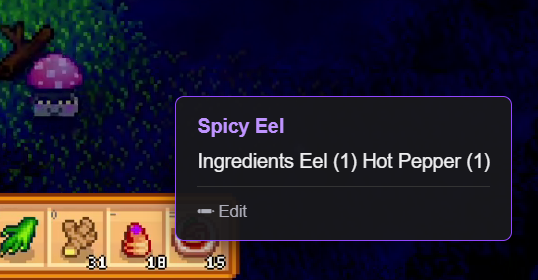
Stream Genie reads video pixels under your cursor. When it recognizes something the community has annotated, it tells you what it knows.
Stream Genie detects the game from the Twitch category and loads the right community profile automatically.
Move your cursor over items in the video — cards, relics, icons, weapons, anything the community has tagged.
A popup appears near your cursor with the community's annotation. Move away and it disappears.
Nothing to configure. The streamer doesn't install a thing. Works on VODs too.
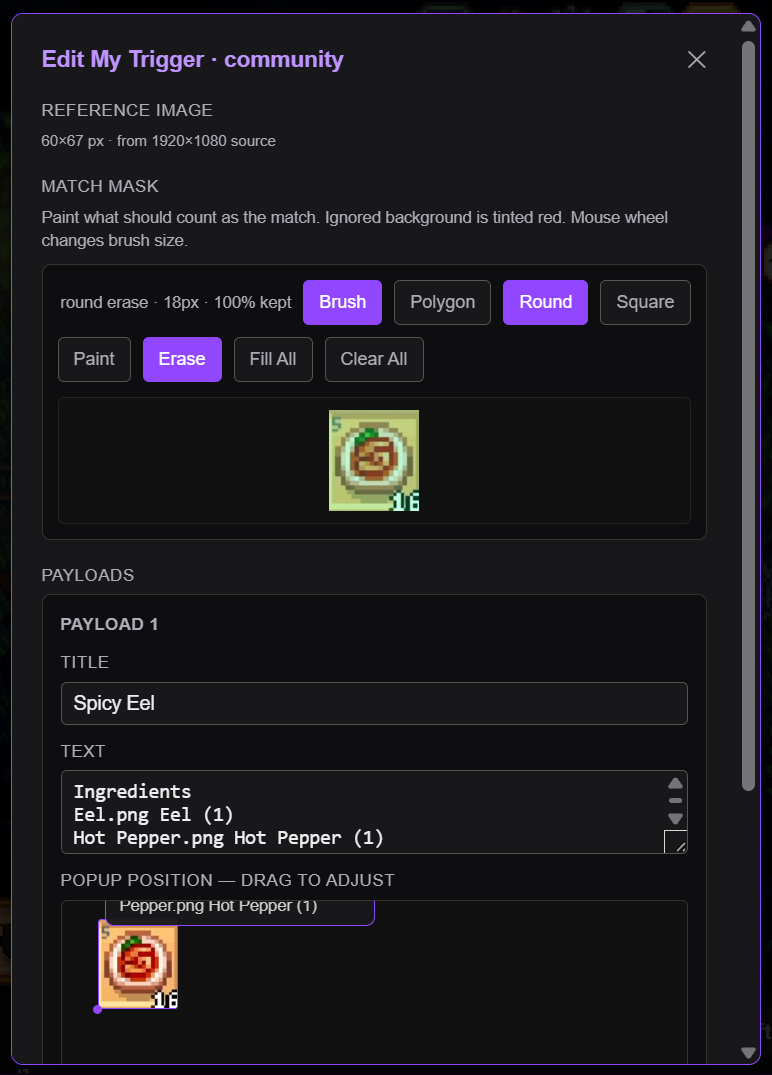
Stream Genie is the framework. You and your community build the knowledge. Adding a trigger takes 30 seconds — freeze the frame, drag a box, write a description, submit.
Submissions go to GitHub as pull requests. Profile owners merge them. Every viewer sees your annotation the moment it lands.
Hover and learn. No setup needed. Works on any stream with a community profile.
Declare a default profile. Your viewers get curated annotations automatically.
Add triggers for any game. Trusted contributors skip the review step entirely.
Free, open source, Chrome only for now.
Download stream-genie-v0.9.zip and unzip it anywhere.
Open Chrome, go to chrome://extensions/, and enable Developer mode.
Click Load unpacked and select the unzipped extension/ folder.
The lamp icon appears in your toolbar. Open a Twitch stream and hover.